
Build and Chat at the Same Time: OAIRA's Dual-Mode Survey Authoring
#surveys#AI#authoring#OAIRA#research design
David Olsson

There's a pattern in how most software adds AI: a separate AI mode, or a separate AI tool, or a chat interface that doesn't really know what's on the screen.
OAIRA's survey builder is structured differently. The canvas and the AI assistant are always present together. Not a mode. Not a tab. The same view, always.
This is what changes when AI is native to the authoring environment rather than adjacent to it.
One Canvas, Two Modes of Working
The survey builder has three panels in constant view:
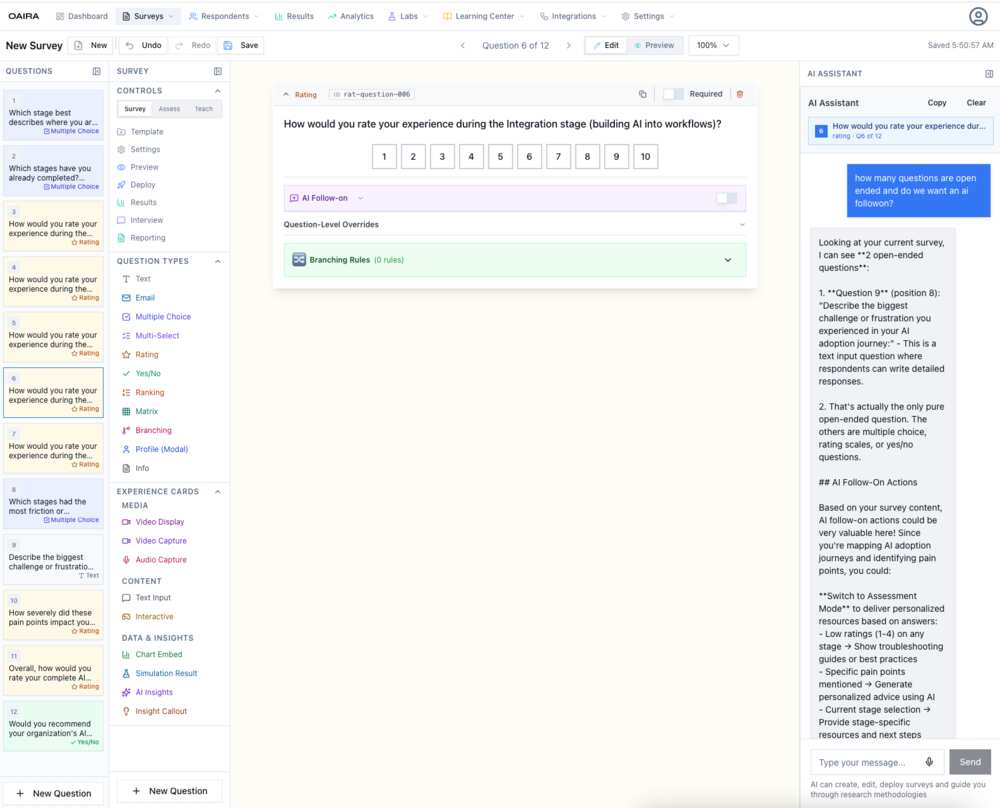
Left: The question list — all questions in the survey, with their types (rating, multiple choice, yes/no, text, ranking, matrix, branching, profile modal) and question-level indicators. You see the whole survey structure at a glance and navigate directly to any question.
Center: The active question canvas — the full question editor. Question type, ID, required toggle, preview of the response interface, AI follow-on settings, question-level overrides (avatar visibility, TTS/STT per question), and branching rules.
Right: The AI assistant — persistent, context-aware, always on. It knows the complete survey: every question, its type, the current methodology, and the research goal. You can ask it anything.
The AI assistant isn't decorative. It's embedded in the same session as the survey you're editing. When you ask "how many open-ended questions do I have?", it counts them. When you ask about AI follow-on actions, it describes specifically what those follow-ons could do given your actual survey content.
What the AI Actually Knows
This is the part that matters most: the AI assistant in the survey builder has full context injection.
When a researcher in one of the screenshots asks "how many questions are open ended and do we want an AI followon?", the assistant responds with a specific analysis:
- Identifies exactly two open-ended questions by position and content
- Notes that question 9 is the only pure open-ended question; others are rating/choice types
- Explains what AI follow-on actions could specifically do given the survey's focus on AI adoption journeys
- Suggests switching to Assessment Mode to deliver personalized resources based on stage-specific ratings
- Offers to generate stage-specific troubleshooting guides triggered by low ratings
This isn't a generic AI writing assistant. It's a research design collaborator that has read the whole survey and can reason about it.
AI Follow-On: Questions That Continue the Conversation
The survey builder surfaces a capability called AI Follow-on at both the survey level and the per-question level.
When enabled, an AI agent can continue the conversation after a respondent answers a question — probing for nuance, asking for specific examples, or exploring an unexpected response. This turns static survey questions into dynamic conversation entry points.
At the question level, you can override AI follow-on behavior per question, toggle it independently, and configure it differently depending on whether you want probing depth for a specific question or a faster pass-through.
This matters particularly for open-ended questions and for rating scales where low or high responses suggest a follow-up is warranted. A rating of 2 on an integration experience question probably wants a different follow-on than a rating of 9.
Question Types and Experience Cards
The builder's question palette reflects the full range of research instruments:
Standard question types: Text, Email, Multiple Choice, Multi-Select, Rating, Yes/No, Ranking, Matrix, Branching, Profile Modal, Info
Experience Cards — Media: Video Display, Video Capture, Audio Capture — for research that involves stimulus materials or captures multimedia responses
Experience Cards — Content: Text Input, Interactive — for richer respondent interactions
Experience Cards — Data & Insights: Chart Embed, Simulation Result, AI Insights, Insight Callout — for surveys that display research outputs within the survey flow
That last category is particularly interesting. A survey can show respondents their own simulation results, embed a chart from prior research, or surface an AI insight — creating a feedback loop between what you're learning and what respondents see.
Branching Logic, In the Same View
Branching rules are configured directly in the question canvas — no separate modal, no separate builder. For each question, you can define rules that route respondents to specific downstream questions based on their response. Operator, comparison value, and target question are set inline.
The AI assistant can reason about your branching structure. Ask it to check for paths that skip critical questions, or to suggest branching rules based on the research methodology, and it responds with specific, survey-aware recommendations.
The Authoring Shift
The combination of live canvas editing and context-aware AI assistance changes the pace and quality of survey design.
In a traditional builder, you design, then review, then revise. You catch problems at the end. You bring in a colleague to audit. You run a pretest to find structural issues.
In OAIRA, the AI is auditing as you go. You design a question and immediately ask whether it's consistent with your methodology. You check your branching logic and get a specific response about which questions are reachable under which conditions. You add an open-ended question and ask what follow-on actions would make it richer.
The iteration loop compresses from days to minutes. And the quality of the instrument improves because the feedback is immediate, specific, and informed by everything else in the survey.
OAIRA is an AI-powered market research platform. The survey builder is available for all survey types across all eight research methodologies.